
Granular role-based access control. Assign different permissions per admin role — view only, delete single, bulk delete, archive, restore, configuration — with full flexibility.
Archive & Delete order for Magento 2
A comprehensive order lifecycle management extension — giving store administrators full control to delete, archive, soft-delete, protect, and audit orders with complete confidence and zero data loss.
Automate order cleanup with 5 configurable cron jobs, protect critical orders from accidental deletion, and get a full audit trail of every admin action — all in one extension.
- Single & bulk order deletion with complete cleanup across 11+ database tables
- Soft Delete (Trash) with 30-day recovery window + Order Archive with restore
- Order protection rules — by status, age, total value, or manual lock
- REST API (14+ endpoints), GraphQL mutations & 5 CLI commands
- Cron automation — auto-archive, auto-delete, trash & log cleanup
- Granular ACL (13+ nodes), full audit logging, auto JSON backup before deletion
11+
Core Features
14+
REST Endpoints
5
Cron Jobs
13+
ACL Permissions
In stock
License Price — One-Time Payment
$10.00
Lifetime updates · No subscriptions
Overview
Everything You Need
to Manage Orders
A complete order management toolkit — delete, archive, protect, and automate with full confidence.

Single & Bulk Order Deletion
Delete individual orders from the order view, or mass-delete hundreds at once. All related data — invoices, shipments, credit memos — is removed completely and cleanly.
Order Archiving
Move old orders to a dedicated archive for long-term storage. Archived orders are removed from the main grid, reducing clutter while remaining searchable and restorable.
Soft Delete (Trash)
Send orders to trash before permanent deletion. Configure retention periods — orders auto-purge after your set number of days, giving you a safety net against accidents.
Order Protection
Protect orders by status, age, order total, or a whitelist of specific order IDs. Prevent accidental deletion of orders that are still active or above a defined value threshold.
Cron Automation
Configure auto-archive and auto-delete schedules to run automatically. Dry-run mode lets you preview what would be affected before any real changes are made.
Full Activity Logging
Every operation is logged with admin user, IP address, timestamps, and order details. Provides a complete audit trail for compliance and accountability.
REST API & GraphQL
Full API support for external integrations. Delete, archive, restore orders programmatically. Includes GraphQL mutations and queries for headless Magento architectures.
CLI Commands
Server-side command-line interface for running operations without the admin UI. Ideal for bulk operations, scheduled tasks, and automated deployment pipelines.
ACL Permissions
Security Controls
Optional password confirmation, two-step confirmation for bulk operations, and max-delete limits. 13+ granular ACL resource nodes.
Auto Backup
Full JSON snapshot of every order before deletion — all related records included — for manual recovery. Configurable retention period.
CSV Import for Bulk Actions
Upload a CSV with order IDs to delete or archive in bulk. Supports multiple header formats with smart column auto-detection.
Feature 01
Order Deletion
Permanently remove orders and every piece of related data from your database — individually or in bulk.
Complete data cleanup,
zero orphaned records
When an order is deleted, the extension removes every associated record automatically — across 11+ related tables. No orphaned data, no broken references, no manual cleanup needed.
- Delete a single order from the order view page with one click
- Mass-delete multiple orders from the orders grid in one action
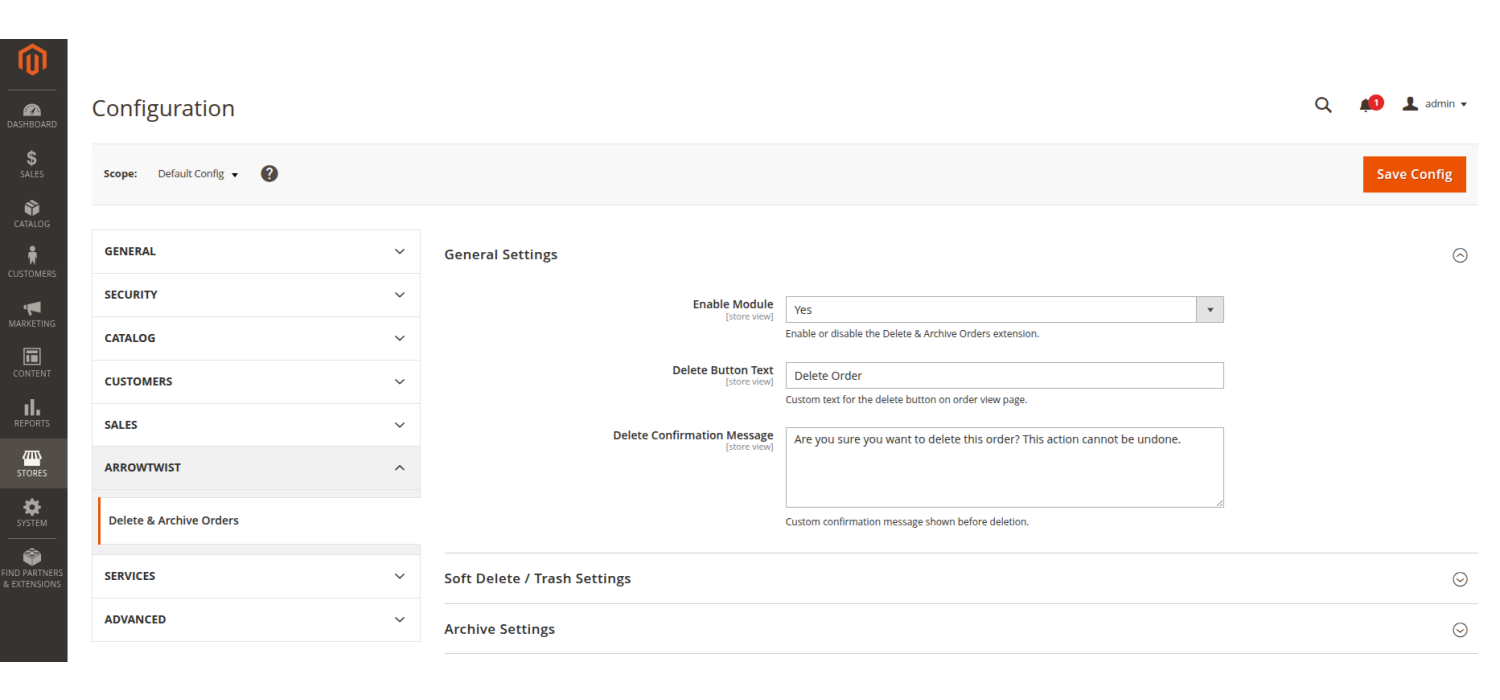
- Configurable confirmation dialog prevents accidental deletion
- Customisable delete button label to match your workflow
- Shows detailed success/error counts after bulk operations
- Optional maximum delete limit prevents runaway bulk actions
- Delete by filters — date range, status, store view, order total
- Import CSV with order IDs for programmatic bulk deletion
Data Removed on Deletion
Order Items & Quantities
sales_order_itemInvoices & Invoice Items
sales_invoice_*Shipments & Tracking
sales_shipment_*Credit Memos
sales_creditmemo_*Payment & Transactions
sales_order_paymentTax Records & Addresses
sales_order_taxOrder Grid Entry & Quote
sales_order_gridFeature 02
Order Archiving
Move old orders out of the main grid while keeping every data point intact — with the ability to restore them at any time.
Archive Grid — Column Reference
Archive ID
InternalOrder # / Customer Email
ReferenceGrand Total & Currency
FinancialOrder Status & Store View
MetaArchived At & Archive Reason
AuditArchived By (Admin User)
AuditActions: Restore / Delete
ActionsClean grid, preserved data,
instant restore
Archiving gives you the best of both worlds — a lean, fast-loading orders grid for day-to-day operations, while all historical order data remains safely stored and fully searchable in the Archive grid.
- Archive single orders from the order view page
- Mass archive multiple orders from the orders grid
- Dedicated Archived Orders grid under the Sales menu
- Filter archived orders by order #, date range, status, customer
- Export the full archive to CSV for reporting
- Restore any archived order back to the main grid instantly
- Permanently delete from archive when no longer needed
- Archive reason field captures why each order was archived
Feature 03
Soft Delete / Trash
A safety net before permanent deletion — orders go to Trash first, recoverable within the configured window.
Delete with confidence,
recover when needed
When Soft Delete is enabled, clicking "Delete Order" moves the order to Trash instead of permanently removing it. Orders remain recoverable until the retention period expires or an admin empties it manually.
- Configurable trash retention period (default: 30 days)
- Dedicated Trash grid under Sales menu
- Restore individual orders back to the main grid from trash
- Permanently delete individual orders directly from trash
- Empty Trash button removes all expired items at once
- Auto-empty via daily cron when retention period expires
- All trash actions fully logged in the activity trail
- ACL-controlled: separate permissions for trash view, restore, empty
Order Lifecycle with Soft Delete Enabled
Admin clicks "Delete Order"
TriggerOrder moved to Trash (not deleted)
SafeWithin retention period → Restore possible
RecoveryRetention expires → Cron auto-purges
ScheduledPermanent deletion + full data cleanup
FinalFeature 04
Order Protection
A multi-layered protection system to prevent accidental deletion of orders that matter most.
Protection Rule Types
Status Protection
e.g. processingAge Protection
≤ 7 days oldTotal Protection
> $500Whitelist by Order ID
Comma-separatedManual Lock (one-click)
Admin buttonOverride (ACL permission)
protection_overrideMultiple protection layers,
one consistent shield
Define which orders are off-limits for deletion — by status, age, value, or individual ID — and optionally lock them manually. Protection rules are enforced consistently in the UI, REST API, GraphQL, and CLI.
- Protect by order status — e.g. block deletion of "processing" orders
- Protect by age — prevent deletion of orders newer than N days
- Protect by order total — safeguard high-value orders above a threshold
- Whitelist specific order IDs that can never be deleted
- Manual protect/unprotect button directly on the order view page
- Protected orders bypass restrictions with ACL override permission
- All protect/unprotect actions logged with admin and timestamp
Feature 05
Cron-Based Automation Engine
Five background jobs run on configurable schedules to keep your store clean — entirely hands-free.
Auto Archive
Automatically archives orders older than the configured threshold, by status and date
Auto Delete
Permanently deletes orders matching age and status criteria. Dry-run mode available for safe preview
Empty Trash
Cleans expired trash items that have passed the configured retention period
Clean Logs
Prunes activity log entries older than the configured retention period
Clean Backups
Rotates backup JSON files, removing those older than backup retention days
Flexible Scheduling
Set auto-archive to daily and auto-delete to weekly, or any custom cron expression. Each job configured independently.
Dry Run Mode
Auto-delete defaults to dry-run — logs what would be deleted without actually removing anything. Perfect for verifying rules before enabling.
Manual CLI Trigger
Run any cron group manually via bin/magento cron:run --group=arrowtwist_deleteorder for immediate execution.
Feature 06
Security Controls & Permissions
Granular role-based access control plus multiple confirmation layers to prevent unauthorized or accidental bulk operations.
Granular permissions,
layered confirmation
The extension ships with a full ACL permission tree — 13+ individual resource nodes — so you can assign precise capabilities per admin role. Security settings add friction to destructive operations.
- 13+ ACL resource nodes across delete, archive, trash, logs, config
- Separate permissions for single delete vs. bulk delete vs. delete-all
- Optional password confirmation before every delete or archive action
- Two-step confirmation modal for bulk operations
- Configurable max delete limit per operation (default: 100)
- Protection override permission for privileged administrators only
- All permissions enforced equally in admin UI, REST API, and GraphQL
ACL Permission Tree
delete_single
Deletedelete_bulk / delete_all
Deletearchive_view / archive_create
Archivearchive_restore / archive_delete
Archivetrash_view / trash_restore / trash_empty
Trashlogs / config / protection_override
AdminFeature 07
Activity Logging, Audit Trail & Auto Backup
Every action is recorded with full context. Every deletion is preceded by a complete JSON backup snapshot.
Complete accountability
for every action
The activity log captures every delete, archive, restore, protect, and unprotect operation with rich contextual data — enabling post-event review, compliance audits, and dispute resolution.
- Logs: delete, archive, restore, protect, unprotect, trash, restore-from-trash
- Records admin username and user ID for every action
- Optionally captures admin IP address per action
- Stores user agent, referer URL, and operation source
- Configurable retention period (default: 365 days)
- Dedicated Activity Logs grid with full filtering & CSV export
- Filter by action type, order number, admin user, date range
- Automatic log cleanup via cron when retention expires
Logged Action Types
delete / delete_permanent
Hard & Softdelete_permanent_trash
Permanentarchive
Archiverestore / restore_from_archive / restore_from_trash
Restoreprotect / unprotect
ProtectionFeature 08
REST API, GraphQL & CLI
Full programmatic access — integrate with ERPs, automate via scripts, or build custom workflows around the extension.
REST API — 14+ Endpoints
Full CRUD coverage for all extension entities. Standard Magento token-based authentication with ACL-mapped resource access.
GraphQL — Queries & Mutations
Full GraphQL schema with paginated queries and mutations for all operations. Ideal for headless storefronts and React/Vue frontends.
CLI Commands
Five Magento console commands for server-side scripting, DevOps pipelines, and scheduled maintenance — with rich option flags.
Feature 09
Delete by Filters & Import for Deletion
Two powerful bulk-operation tools for processing large volumes of orders without selecting them one by one.
Delete by Filters
Navigate to Sales → Delete & Archive Orders → Delete by Filters and target orders by criteria — no individual selection required.
- Filter by order date range (from / to)
- Filter by one or more order statuses
- Filter by store view
- Filter by grand total range (min / max)
- Filter by customer email (partial match)
- Preview matching order count before executing
- Sample table shows first 10 matching orders
- Execute button disabled when zero orders match
- Choose Delete (to Trash) or Archive action
- Option to automatically skip protected orders
Import for Deletion
Navigate to Sales → Delete & Archive Orders → Import for Deletion and upload a CSV of order increment IDs to process in bulk.
- Accepts CSV files with various header formats:
increment_id,order_id,order # - Additional columns in the CSV are safely ignored
- Duplicate IDs in the file are processed only once
- Leading/trailing whitespace in IDs trimmed automatically
- Choose Delete or Archive action for all uploaded IDs
- Skip Protected option to avoid errors on protected orders
- Results summary: total, success, not found, protected, errors
- All import actions logged with "Import for Deletion" source tag
Feature 10
Email Notifications
Keep designated administrators informed whenever orders are deleted or archived — with configurable recipients, custom templates, and error alerts.
Operation Alerts
Send automatic email notifications when orders are deleted, archived, or restored — keeping your team in the loop without manual updates.
Multiple Recipients
Configure a comma-separated list of recipient email addresses. Different stakeholders — operations, compliance, management — can all be notified simultaneously.
Error Notifications
When enabled, failed delete or archive operations trigger an immediate alert email — so issues are spotted and resolved quickly before they cause data problems.
Custom Email Template
Select from Magento's standard transactional email templates or create a fully custom one with your own branding and content via the Magento Email Templates system.
Optional / Disabled by Default
Email notifications are disabled by default to avoid noise on stores that don't need them. Enable only when required — configurable per store scope.
Works with Cron Automation
Notifications also fire for auto-archive and auto-delete cron operations — so even background jobs can alert you when large batches of orders are processed overnight.
Customer Reviews
SW
Sarah Whitfield
5
Finally a Magento 2 order delete that works
I tried two other extensions before this one. Both had bugs with related data — invoices were left orphaned, shipments weren't removed. ArrowTwist cleans everything: items, addresses, payments, transactions, credit memos. Nothing left behind.
CR
Carlos Rivera
5
REST API integration worked flawlessly
Our ERP system needed to trigger order deletions automatically. The REST API endpoints were documented clearly and worked on first try. Authentication was standard OAuth2. Highly recommend for any store with external integrations.
AM
Anika Müller
5
Excellent ACL permission control
As a store owner with multiple admin roles, granular permissions were critical for me. This extension's ACL tree is the most detailed I've seen — I can restrict junior staff to view-only while giving senior managers full delete rights. Really well thought out.
TB
Tom Bradley
5
Saved hours of manual cleanup
Before this extension, I was manually deleting test and cancelled orders one by one. Now I bulk delete hundreds in one go. The soft delete / trash feature gives me peace of mind before permanent deletion. Well worth every penny.
PN
Priya Nair
5
Archive feature is a game-changer
We needed to keep old orders for compliance but didn't want them slowing down our grid. The archive feature is exactly what we needed. Auto-archive with configurable status filters works perfectly. Restored orders in seconds when needed.
JH
James Holloway
5
Essential extension for store cleanup
I've been running a Magento 2 store for years and always struggled with test orders cluttering the admin. This extension solved everything. The mass delete feature is incredibly smooth and the confirmation dialog prevents accidental deletions. Installation via Composer was painless.
Write Your Own Review